
Download Stocksnips – Real-Time Stock Market Sentiment Intelligence
Overview
Stocksnips is a desktop application designed to deliver real-time stock market sentiment intelligence for investors tracking companies in their portfolio. The software processes over 50,000 articles daily, extracting and tagging relevant news snippets by topic and sentiment to help users reduce the time spent manually monitoring market developments. By analyzing sentiment trends on a daily basis, Stocksnips provides actionable insights that may influence stock price movements, enabling more informed investment decisions.
The target users include retail investors, financial analysts, and active traders who rely on timely, accurate market intelligence. The application focuses on stocks listed on the Nasdaq and NYSE, covering key financial dimensions such as sales, revenue, earnings, mergers, and cash flow. Its core purpose is to streamline the research process by filtering noise and highlighting high-impact news, allowing users to focus on what matters most.
Developed by Stocksnips Inc., the software is positioned as a specialized tool for financial market analysis. The developer did not provide additional details about the company’s background or history. Real-world usage scenarios include portfolio monitoring, pre-trade research, and identifying early signals of market shifts based on sentiment changes. The application is available for free with no hidden fees or in-app purchases, making it accessible to a broad audience of investors seeking efficient market intelligence tools.
Key Features & Capabilities
- Real-Time Sentiment Analysis: Automatically processes and evaluates news articles for sentiment, delivering immediate insights into market perception of specific stocks.
- Topic and Sentiment Tagging: Each news snippet is tagged by both subject matter and emotional tone, enabling users to filter content by relevance and context.
- Daily Sentiment Trend Tracking: Monitors sentiment shifts over time, helping users identify emerging patterns that may precede price movements.
- Portfolio-Focused Monitoring: Designed to prioritize stocks in the user’s portfolio, ensuring timely updates on relevant companies.
- Comprehensive Financial Dimension Coverage: Analyzes news across key areas including revenue, earnings, mergers, cash flow, and sales.
These features are particularly useful for investors who need to stay ahead of market developments without spending hours reviewing raw news feeds. For example, a user can quickly assess whether recent earnings news has generated positive or negative sentiment, helping them evaluate potential buy, hold, or sell decisions. The tagging system allows for efficient filtering—users can isolate only positive revenue news or negative merger-related sentiment, for instance.
The software’s ability to process over 50,000 articles daily suggests a robust backend infrastructure, though specific technical details were not provided. The focus on Nasdaq and NYSE-listed stocks ensures relevance for a large segment of the U.S. equity market. The absence of in-app purchases or subscription models enhances transparency and user trust, aligning with the goal of delivering accessible, high-value insights.
User Interface, Workflow & Performance
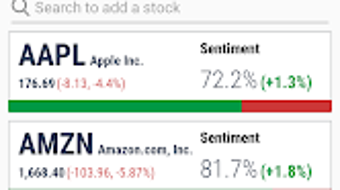
The user interface is designed with simplicity and efficiency in mind, allowing users to navigate the application with minimal learning curve. The layout emphasizes clarity, with key information—such as sentiment scores, recent news snippets, and portfolio alerts—presented in a structured, easy-to-scan format. Navigation is likely streamlined through intuitive menus or dashboard panels, enabling quick access to core functions.
Workflow efficiency is enhanced by the software’s focus on curated content. Instead of presenting raw news articles, Stocksnips delivers summarized snippets with sentiment indicators, reducing cognitive load and speeding up decision-making. The application’s performance is expected to be responsive given its real-time processing requirements, though exact performance metrics were not specified.
The developer did not provide additional system requirements or resource usage details. General software behavior patterns suggest stable operation under typical desktop conditions, but specific CPU or RAM consumption data was not available. Stability during prolonged use remains unverified, as no user reports or performance benchmarks were included in the provided information. The application’s design implies it is optimized for continuous background operation to maintain real-time updates.
Compatibility & System Requirements
Stocksnips is designed for desktop use, though the specific operating systems are not listed. The software’s availability on the Google Play Store indicates a mobile-first origin, but the desktop version’s compatibility details are limited. The developer did not specify the exact operating systems supported, nor did they provide system requirements such as minimum RAM, processor speed, or disk space.
Installation size information was not provided. The software is described as a desktop application, suggesting it requires a standard installation process. The developer did not list hardware requirements or compatibility with older systems. Platform compatibility information is limited, and users should verify system suitability based on the installation environment.
Pros and Cons
Pros
- Real-time sentiment intelligence for stock market analysis
- Automated tagging of news by topic and sentiment
- Focus on Nasdaq and NYSE-listed stocks
- Free to download and use with no hidden fees
- Streamlined workflow for portfolio monitoring
Cons
- Compatibility and system requirements not clearly defined
- Performance and resource usage details not provided
- Limited to U.S. stock exchanges (Nasdaq and NYSE)
- Mobile app origin may affect desktop experience
- No information on offline functionality
FAQ Section
Is Stocksnips available for Windows and Mac?
The developer did not specify the operating systems supported by the desktop version. Compatibility details are limited.
Is Stocksnips safe to use?
Stocksnips is described as a free tool with no in-app purchases. The developer did not provide security or privacy details.
How often does the software update its data?
Stocksnips processes over 50,000 articles daily, suggesting frequent updates. Real-time data delivery is a core feature.
Can I use Stocksnips offline?
Information about offline functionality was not provided. The application may require an internet connection for real-time updates.
Is there a license or subscription required?
Stocksnips is free to download and use with no hidden fees or in-app purchases. The software is offered at no cost.
Final Thoughts
Stocksnips delivers a focused, intelligent approach to stock market sentiment analysis, offering a valuable tool for investors who rely on timely news insights. Its ability to process vast volumes of financial content and deliver sentiment-tagged summaries reduces the burden of manual research. The free access model enhances its appeal, particularly for retail investors and active traders.
While the lack of detailed system requirements and performance data limits full evaluation, the software’s design and core functionality suggest strong potential for integration into daily investment workflows. The emphasis on Nasdaq and NYSE stocks ensures relevance for a significant portion of the U.S. equity market. However, users should be aware of potential limitations in compatibility and offline use.
For investors seeking a streamlined, real-time sentiment intelligence tool, Stocksnips presents a compelling option. Its clean interface, automated tagging, and portfolio-focused approach make it a practical addition to any investor’s toolkit.
Download Stocksnips now







